Understanding W2 Generators: What They Are & How They Help You

A W2 generator is an online tool that creates a replica or mock-up of an IRS Form W-2, Wage and Tax Statement. You input your wage and tax withholding data, and the system produces a professional-looking document. It's used for various non-tax filing purposes, like verifying income for loans or rental applications.
As a payroll software engineer with eight years in the trenches, I've seen firsthand the intricacies of payroll documents. We build systems that handle everything from hourly wages to complex tax calculations. So, when people talk about a "W2 generator," it often raises eyebrows. Is it for creating official tax documents? Not exactly. Let's clear up the confusion.
What Exactly is a W-2 Form?
An IRS Form W-2, Wage and Tax Statement, is a big deal. Every year, employers have to send one to each employee and to the Social Security Administration (SSA). This form reports your annual wages and the amount of taxes withheld from your paychecks. It’s absolutely essential for filing your personal income tax return with the IRS. Without it, you’d have a heck of a time telling the government what you earned and how much tax you already paid.
Key Components of a W-2
A W-2 isn't just a simple slip of paper. It's packed with information.
- Boxes A-F: These identify the employee and the employer. Your name, address, Social Security number, and your employer’s name, address, and Employer Identification Number (EIN) are all right there.
- Box 1: This shows your total taxable wages, tips, and other compensation. This is the big number the IRS cares about for your income tax.
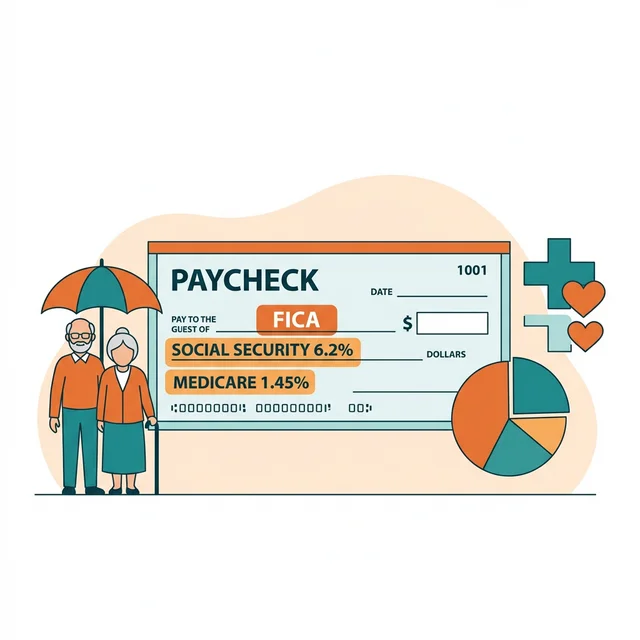
- Boxes 2-6: Here's where all the tax withholding lives. You'll see federal income tax withheld (Box 2), Social Security wages and tax (Boxes 3 and 4), and Medicare wages and tax (Boxes 5 and 6). Did you know the FICA tax rate for employees is 7.65% for Social Security and Medicare combined? That's split between you and your employer.
- Boxes 7-14: These cover other important details, like non-taxable benefits, deferred compensation, and state or local income taxes.
Employers must issue W-2 forms by January 31st each year for the preceding tax year. This deadline gives employees enough time to file their tax returns before the April deadline. Missing this date can lead to penalties for businesses, something no one wants.
Who Needs a W-2? Employees vs. Contractors
This is where things can get a bit muddy. Only employees receive a W-2. If you're an independent contractor, you'll receive a Form 1099-NEC (Nonemployee Compensation) instead, or maybe a 1099-MISC. The distinction between an employee and a contractor is vital, both for workers and for businesses. Misclassification can lead to serious legal and tax headaches for employers. The IRS has pretty clear guidelines for making this determination, often focusing on control over how, when, and where the work is done. You can find more detail on worker classification on the IRS website.
So, if you're working for someone else and they control your hours, give you equipment, and dictate your workflow, chances are you're an employee. And that means a W-2 is coming your way. If you need to verify your regular earnings as an employee, you might also be interested in creating a professional check stub maker that clearly lays out your gross pay, deductions, and net pay for each period.
The "W2 Generator": What it's and Isn't
Now, to the heart of the matter: what's a "W2 generator" really doing? It's to understand this. A W2 generator is not a tool for creating official, IRS-compliant W-2 forms that your employer would send to you or the government for tax filing. It can't magically create legitimate tax documents out of thin air. Real talk: attempting to use a generated W-2 for official tax purposes when you haven't received one from an actual employer is fraud. It's a serious offense.
What it is, however, is a utility that creates a document mimicking an official W-2. It's built to look exactly like the real thing, but it's based on data you provide. Think of it as a sophisticated template.
Here's a quick comparison to make it clear:
| Feature | Official IRS Form W-2 | W2 Generator Output (Mock-up) |
|---|---|---|
| Issuer | Employer (who paid you) | You (the user) via an online service |
| Purpose | Tax filing, government reporting, income verification | Income verification, personal records, loan applications, etc. |
| Data Source | Employer's payroll records (actual wages, actual withholdings) | User-entered data (simulated wages, simulated withholdings) |
| Authenticity | Legally binding, verifiable by IRS/SSA | Not legally binding for tax purposes, based on user input |
| Legal Use | Required for tax filing | For personal use, loan/rental applications (with consent) |
How W-2 Generators Work
The process is fairly straightforward, assuming you've the necessary information. You visit an online service, like one that offers an online paystub maker, and navigate to their W2 generation section. Then, you'll enter data into various fields.
- Employer Information: This includes the employer's name, address, and Employer Identification Number (EIN).
- Employee Information: Your name, address, and Social Security number.
- Wage Data: Your total gross wages, tips, and other compensation for the year.
- Tax Withholding: This is where you put in the amounts withheld for federal income tax, Social Security tax, and Medicare tax. You might also include state and local tax withholdings. If you're wondering how those numbers are typically calculated, a good paycheck calculator can help you estimate deductions from your gross pay.
Once you’ve input all the required details, the generator takes over. It formats the data into a standard W-2 layout, often replicating the exact design of the IRS form. You can then download and print this document. Some advanced tools even let you customize specific fields or add watermarks (though you shouldn't if you're aiming for realism for a legitimate purpose).
Why You Might Use a W-2 Generator
Okay, so if it's not for tax filing, why would anyone use one? Good question! In my experience, most people turn to these tools for very practical, legitimate reasons related to income verification.
- Loan Applications: Whether it's a mortgage, an auto loan, or a personal loan, lenders need to see proof of your income. They want assurance you can repay what you borrow. A generated W-2 can provide that documentation, especially if you're between jobs and trying to consolidate old pay stubs (though lenders prefer official documents, it can sometimes fill a gap while you're gathering everything).
- Rental Applications: Landlords want to know you can pay the rent. Just like with loans, a generated W-2 can serve as a quick way to demonstrate your income stability.
- Proof of Employment/Income: Sometimes you just need a document that summarizes your earnings for a specific period for personal financial planning or other administrative tasks. Maybe you're organizing your financial records for a meeting with an advisor.
- Correcting Errors (for discussion): I've seen clients use these to create a "what if" scenario. They believe their employer's W-2 had an error, so they generate one with what they believe are the correct figures to use as a basis for discussion with their HR or payroll department. This isn't for submission, just for dialogue.
- Understanding Your Pay: A W-2 generator can help you visualize how all your wages and deductions add up over a year, giving you a clearer picture of your overall compensation structure. It's a great learning tool.
Here's the thing though — always be transparent about what you're providing. If you're using a generated W-2 for an application, you should always disclose that it's a self-generated document based on your records, not an official form from your employer. Most places will still want the official document. But it can buy you time.
Legal and Ethical Considerations
This is where we need to be very clear. Using a W2 generator for fraudulent purposes is illegal. Creating a fake W-2 to falsely inflate your income for a loan, to evade taxes, or to misrepresent your employment status carries severe penalties, including fines and imprisonment. The IRS, banks, and landlords have ways to verify income. they'll check.
- Authenticity: Real W-2 forms have specific security features, mailing envelopes, and are issued by employers who report the same information to the SSA. Generated forms lack these official backing mechanisms.
- Fraud Risks: Submitting a fabricated document to a financial institution, government agency, or landlord constitutes fraud. Don't do it. It's simply not worth the risk.
- Important Disclaimers: Any reputable W2 generator service will clearly state that their output is for personal use and income verification only and should not be used for official tax filing or fraudulent purposes. If a service encourages you to use their forms for official tax submissions without proper employer issuance, run the other way.
Always keep your actual, official W-2 forms in a safe place. They're vital for your tax records.
Choosing a Reliable W-2 Generator
If you decide you need a W-2 generator for legitimate reasons, how do you pick a good one? There are quite a few services out there. You want something that's accurate, easy to use, and secure.
- Accuracy: Does it precisely mimic the IRS W-2 form layout? This is important for credibility. Any discrepancies could raise red flags for anyone reviewing it.
- Ease of Use: A good generator should have a clean, intuitive interface. You shouldn't need a degree in accounting to figure out how to input your data.
- Security: You're inputting sensitive personal and financial data. Look for services that use secure connections (HTTPS) and have clear privacy policies. They shouldn't be storing your data indefinitely without your explicit permission.
- Cost: Many services offer W-2 generation as part of a broader package, or as a standalone paid service. Be wary of anything "free" that seems too good to be true, especially if it asks for too much personal info without clear security assurances.
Remember, many of these platforms also help you create your pay stub in minutes. They often use similar underlying technology to format and present financial data clearly. You can also learn more about payroll terms and definitions by visiting our payroll glossary.
For related discussions on different paystub tools, you might find our article "Paystub Vs Thepaystubs" helpful. We also touched on specific company paystubs in "Walmart Paystub Generator."
Common Misconceptions About W2s and Generators
There are some persistent myths I hear all the time. One is that you can just "make" a W-2 if your employer never sent you one. That’s wrong. If your employer doesn't send you a W-2 by January 31st (or a few days later if it's mailed), you should contact them immediately. If that doesn't work, the IRS can help. They'll reach out to your employer on your behalf. Don't create your own for tax filing. It won't work, and you could get in trouble. You can get details on what to do if you don't receive your W-2 from the IRS directly.
Another misconception is that W-2 generators are somehow affiliated with the IRS or SSA. They aren't. they're independent software tools designed to help you organize your own financial information into a familiar format. It’s like using a spreadsheet program to manage your budget; the program isn't the bank, it's just a tool.
Practical Actionable Takeaway
Understanding the proper use of a W2 generator is key. It's a valuable utility for personal organization and legitimate income verification for things like loans or apartment applications, but it's absolutely not for generating official tax documents. Always use your actual W-2 provided by your employer for tax filing purposes. If you need a clear, professional document to summarize your annual earnings and tax withholdings for non-tax related uses, a W2 generator can certainly help. Just ensure you're using it ethically and transparently. And if you're ever in doubt about the authenticity of any document, always err on the side of caution and seek official sources. If you need a professional pay stub right now, you can create one in under 2 minutes.
Frequently Asked Questions
What's the main difference between an official W-2 and one from a generator?
An official W-2 form is issued by your employer and the information on it's also reported to the Social Security Administration (SSA) and the IRS for tax purposes. A W-2 generated by an online tool is a replica based on data you input, intended for personal record-keeping or income verification, but not for official tax filing or submission to government agencies.
Can I use a W2 generator to get my W-2 if my employer hasn't sent it?
No, you shouldn't use a W2 generator for this. If your employer hasn't sent your official W-2 by the January 31st deadline, first contact your employer directly. If you still can't get it, the IRS can assist you in obtaining the form. Creating your own W-2 for tax filing isn't a legitimate solution.
Are W2 generators legal?
Yes, using a W2 generator to create a replica document for personal record-keeping or legitimate income verification (like for a loan application, while being transparent about its origin) is legal. However, using a generated W-2 for fraudulent activities, such as misrepresenting income to secure a loan or evade taxes, is illegal and carries severe penalties.
What information do I need to use a W2 generator?
To accurately use a W2 generator, you'll need essential details such as your employer's name, address, and EIN, your own name, address, and Social Security Number, along with your total annual wages and the amounts withheld for federal, state, and local taxes. This information typically comes from your pay stubs or other payroll records.
Sources
- IRS Topic No. 159, What to Do if You Didn't Receive Your W-2 — Internal Revenue Service
- Employer's Tax Guide (Publication 15) — Internal Revenue Service
- Employee vs. Independent Contractor: What's the Difference? — Society for Human Resource Management (SHRM)
- what's a W-2 Form? — Investopedia
- How to Pay Employees: A Guide for Small Businesses — Gusto

About ValidPaystubs Editorial Team
Articles on ValidPaystubs are written and maintained by the editorial team at Sweethelp LLC, the company that operates this site from Sheridan, WY. We are a small team, not a firm of accountants — we build the tool and document how US payroll figures work, citing the IRS and state revenue departments so you can check any number against its source. Nothing here is tax, legal or financial advice, and for a decision that matters you should talk to a licensed professional.
View Profile