Why Excel Paystubs Get Rejected: The Complete Guide to Professional Income Documentation (2026)
Why Excel Paystubs Get Rejected: The Complete Guide to Professional Income Documentation
We get it. You're starting a business, funds are tight, and you Google "Free Paystub Excel Template." You find one, fill in the blanks, and hand it to your employee.
Then they try to rent an apartment. And they get rejected.
Or worse—they apply for a car loan, and the underwriter asks for "additional documentation" because something about the paystub seems "off."
In 2026, underwriters, landlords, and loan officers are trained to spot DIY documents from a mile away. The "homemade" look that seemed cost-effective actually undermines your credibility and your employees' financial opportunities.
In this comprehensive guide, we'll explain exactly why Excel paystubs fail verification, the specific red flags they trigger, and how to upgrade to professional documentation without breaking the bank.
Quick Comparison: Excel vs Professional Generator
| Aspect | Excel Template | Professional Generator |
|---|---|---|
| Initial Cost | Free | Small per-document fee |
| Tax Accuracy | Manual (error-prone) | Automatic (2026 tables) |
| Visual Authenticity | "Homemade" look | Corporate payroll appearance |
| MICR/Check Features | None | Industry-standard |
| OCR Compatibility | Poor | Optimized |
| Acceptance Rate | Low-Medium | High |
| Liability Risk | You | Reduced |
The 7 Reasons Excel Paystubs Get Rejected
1. The Missing MICR Line
Look at any authentic paycheck from a Fortune 500 company. At the bottom, you'll see a strange, blocky font containing routing and account numbers. That's MICR (Magnetic Ink Character Recognition)—a specialized encoding used by banks to process checks.
What Excel Produces:
- Standard fonts (Arial, Calibri, Times New Roman)
- No security features
- No banking integration
What Reviewers Expect:
- OCR-B or E-13B MICR fonts
- Properly formatted routing/account sequences
- Industry-standard check positioning
When a loan officer sees a "pay stub" without proper check formatting, an immediate red flag appears in their mind: this wasn't generated by real payroll software.
2. The Tax Math Trap
Excel is fantastic at calculations—but it doesn't know tax law.
If you're using a template from 2023 (or earlier), your tax calculations are almost certainly wrong. Here's what changes annually:
2026 Tax Updates You Might Miss:
- Social Security wage base: $168,600 (changed from $160,200)
- Medicare Additional Tax threshold: $200,000
- Federal tax brackets: Adjusted for inflation
- State tax rates: ~15 states changed rates in 2025-2026
- Local taxes: Constantly changing
Scenario: You set up an Excel formula that takes 6.2% for Social Security. Your employee earns $180,000. In December, you're still deducting SS on wages above $168,600.
Result: A sophisticated underwriter spots that you've withheld Social Security tax on income exceeding the wage base. Instant credibility loss. They now know the document is either fake or created by someone who doesn't understand payroll.
3. The Formatting "Tells"
Professional payroll software has specific visual characteristics that are difficult to replicate in Excel:
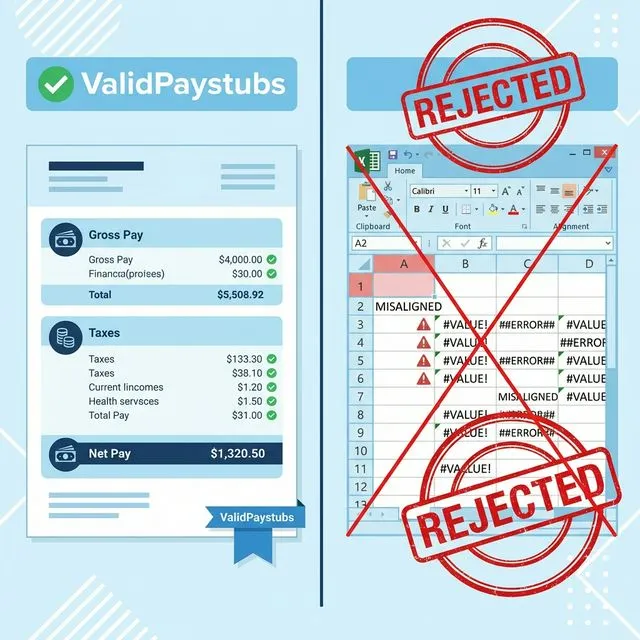
Column Alignment Real payroll output uses precise column alignment with consistent decimal placement. Excel templates often have:
- Slightly misaligned columns
- Inconsistent spacing
- Currency symbols that don't line up
- Totals that don't visually balance
Font Consistency Professional systems use specific fonts:
- Courier or monospace for data (ensures alignment)
- Helvetica/Arial for labels
- Consistent point sizes throughout
Excel users typically:
- Mix fonts accidentally
- Use variable-width fonts where fixed-width is expected
- Have inconsistent sizing between sections
White Space and Density Real paystubs are dense—packed with information. Excel templates often look sparse, with excessive white space that signals "amateur."
4. The Missing Details
A real corporate paystub contains numerous small details that Excel templates typically omit:
What's Missing from Most Excel Templates:
- Employee ID numbers
- Pay period sequence numbers
- Batch processing codes
- Employer Identification Number (EIN) prominent display
- Tax filing status notation (e.g., "MFJ-2")
- Detailed YTD columns for every line item
- Legal disclaimers and fine print
- Check sequence numbers
These "micro-details" seem trivial but collectively create the authentic look of corporate documentation. Their absence screams "homemade."
5. The Resolution Problem
This one is subtle but significant.
Excel's Output:
- Typically 72-96 DPI (screen resolution)
- Text renders clearly on screen
- Prints at lower quality
- Degrades when scanned
The Document Lifecycle:
- You create PDF (looks fine)
- Recipient prints it
- They scan it into their system
- It's viewed on various screens
- Possibly reprinted
At each stage, a low-resolution document loses quality. By the time an underwriter reviews a multiply-processed Excel stub, it may look noticeably fuzzy.
Professional Generators:
- 300 DPI output (print quality)
- Vector-based elements (scale infinitely)
- Survives multiple print/scan cycles
- Always crisp
6. The Audit Trail Issue
When a lender or landlord verifies employment, they often call the employer. What they're looking for:
- Confirmation that this person works there
- Verification of approximate income
- Proof of legitimate documentation practices
The Question That Kills: "What software do you use for payroll?"
If you answer: "I made it in Excel..."
Their confidence drops immediately. Excel isn't payroll software. It signals:
- No formal processes
- Potential calculation errors
- Higher fraud risk
- Amateur operation
If you answer: "We use a professional paystub generator..."
Different perception entirely. You've invested in proper tools. You take documentation seriously.
7. The Fraud Detection Factor
Banks and major landlords increasingly use automated fraud detection. These systems look for:
Document Metadata:
- What software created the PDF?
- What fonts are embedded?
- Are there editing traces?
An Excel-generated PDF has different metadata than a paystub-specific generator. Some systems flag Excel paystubs automatically for manual review.
Visual Pattern Matching: Advanced systems compare submitted documents against known templates. If your document doesn't match patterns from ADP, Paychex, Gusto, or other major providers, it may trigger investigation.
The Real Cost of "Free"
The Hidden Costs You Don't See
Direct Costs:
- Rejected apartment applications (lost fees: $50-200)
- Denied loan applications (missed opportunity cost: priceless)
- Additional documentation requests (time value: hours)
Indirect Costs:
- Employee frustration ("Why won't my paystub work?")
- Business reputation damage ("They gave me a fake-looking stub")
- Legal liability if calculations are materially wrong
- Time spent redoing rejected documents
Case Study: Employee Denied Apartment
Your employee John uses your Excel paystub to apply for an apartment. The property manager:
- Notes the "unusual formatting"
- Requests additional verification
- Calls your number (you miss the call)
- Rejects the application for "incomplete verification"
John loses:
- $100 application fee
- His preferred move-in date
- 3 days of apartment searching
- Goodwill toward your company
Total hidden cost of "free" Excel template: Hundreds of dollars and damaged trust.
What Professional Paystubs Actually Look Like
Visual Characteristics of Authentic Documents
Header Section:
- Company name, address, EIN prominently displayed
- Pay period dates clearly stated
- Employee information with ID numbers
- "EARNINGS STATEMENT" or similar header
Earnings Section:
- Multiple columns: Description, Rate, Hours, Current, YTD
- Separate lines for regular, overtime, bonuses
- Clear subtotal row
Deductions Section:
- Tax deductions with full names and codes
- Pre-tax deductions separately labeled
- Post-tax deductions clearly marked
- Each item with current period and YTD
Summary Section:
Check/Payment Section:
- Check number (if applicable)
- MICR encoding line
- Date and amount
- Signature line or electronic notation
Typography That Signals Authenticity
For Numerical Data:
- OCR-B font (specifically designed for machine reading)
- Courier Prime or monospace alternatives
- Consistent decimal alignment
For Labels:
- Helvetica Neue or Arial
- Consistent sizing hierarchy
- Professional weight (not too light, not too bold)
For Legal Text:
- Smaller point size
- Condensed for space efficiency
- Complete sentences (not fragments)
How ValidPaystubs Solves These Problems
Automatic Tax Calculation
Our engine updates January 1st every year with:
- Federal tax tables from IRS Publication 15-T
- All 50 state income tax rates
- Local taxes (NYC, Philadelphia, etc.)
- FICA wage base limits
- State-specific programs (SDI, DBL)
You never worry about outdated formulas or missed rate changes.
Professional Template Library
We offer templates modeled after real payroll providers:
- ADP-style classic layouts
- Gusto-inspired modern designs
- Check-on-bottom formats
- Contractor statement formats
Each template includes:
- Appropriate density and detail
- Proper font selection
- Correct spacing and alignment
- All necessary fields
Industry-Standard Fonts
We use:
- OCR-B for check numbers and MICR lines
- Courier Prime for earnings and deduction data
- Helvetica Neue for labels and headers
These aren't aesthetic choices—they're authenticity signals that verification professionals recognize.
Vector PDF Output
Our PDFs use vector graphics where possible:
- Text scales without quality loss
- Lines and shapes remain crisp
- Survives multiple print/scan cycles
- OCR-optimized for automated processing
Unlimited Corrections
Made a mistake? Unlike Excel where you might forget what formulas you used:
- Edit directly in our interface
- See calculations update in real-time
- Regenerate corrected PDF instantly
- No additional charge for corrections
When Excel MIGHT Be Acceptable
For Personal Records Only
If you're creating stubs purely for your own financial tracking—never to be shared with third parties—Excel can work. You know you're honest about the numbers.
When No Verification Will Occur
If you're 100% certain no one will verify your document (rare in 2026), the appearance matters less. But predict this wrong, and you face rejection.
As a Temporary Measure
If you need a placeholder while setting up proper systems, an Excel stub might bridge the gap—with full understanding that it may not pass scrutiny.
Making the Switch
From Excel to Professional Generator
-
Determine your needs:
- How many employees?
- How frequently do you pay?
- Do you need historical stubs?
-
Choose a generator:
- Compare features (tax calculation, templates, corrections)
- Consider ValidPaystubs's instant generation
-
Enter your information once:
- Company details become saved
- Employee info reusable
-
Generate professional stubs:
- Takes 2-3 minutes
- Download immediately
- Share with confidence
Cost-Benefit Reality
Excel Template:
- Initial cost: $0
- Time per stub: 20-30 minutes (entering data, checking formulas)
- Error probability: High
- Acceptance rate: Medium-Low
- Liability: Yours if wrong
Professional Generator:
- Cost per stub: Small fee
- Time per stub: 2-3 minutes
- Error probability: Very low (automated calculations)
- Acceptance rate: High
- Liability: Reduced (industry-standard calculations)
Frequently Asked Questions
Is It Illegal to Use Excel for Pay Stubs?
Not inherently. There's no law mandating specific software. However:
- If calculations are materially wrong, you may face IRS penalties
- If presented for fraud, you're liable
- Employees negatively affected may have claims
My Excel Stub Was Accepted Once—Why Not Always?
Different reviewers have different thresholds:
- A local landlord might accept anything
- A mortgage underwriter scrutinizes thoroughly
- Automated systems flag certain patterns
Your past luck doesn't guarantee future acceptance.
How Do I Explain the Switch to Employees?
Simply: "We've upgraded to professional payroll documentation software. Your stubs now look more authentic and will be accepted everywhere."
They'll thank you when their loan applications go smoothly.
Can Underwriters Really Tell the Difference?
Absolutely. Professionals who review documents daily develop an eye for:
- Template patterns
- Calculation accuracy
- Visual authenticity
- Format consistency
What seems "fine" to you may scream "homemade" to them.
The Bottom Line
In 2026, professional income documentation isn't a luxury—it's a baseline expectation.
Your employees need documents that:
- Pass bank scrutiny
- Satisfy landlord requirements
- Survive automated verification
- Reflect well on your business
An Excel template saves you a few dollars on the front end but costs potentially thousands in rejected applications, lost credibility, and professional embarrassment.
ValidPaystubs offers:
- Accurate 2026 tax calculations
- Professional, authentic layouts
- Industry-standard typography
- Instant generation without Excel formula headaches
- Unlimited corrections for peace of mind
Stop gambling with DIY documents. Upgrade to professional-grade paystubs.
Ready for documents that pass verification?
Accurate calculations. Authentic appearance. Accepted everywhere.
Sources & References

About ValidPaystubs Editorial Team
Articles on ValidPaystubs are written and maintained by the editorial team at Sweethelp LLC, the company that operates this site from Sheridan, WY. We are a small team, not a firm of accountants — we build the tool and document how US payroll figures work, citing the IRS and state revenue departments so you can check any number against its source. Nothing here is tax, legal or financial advice, and for a decision that matters you should talk to a licensed professional.
View Profile