How to Get Your W2 Online for Free
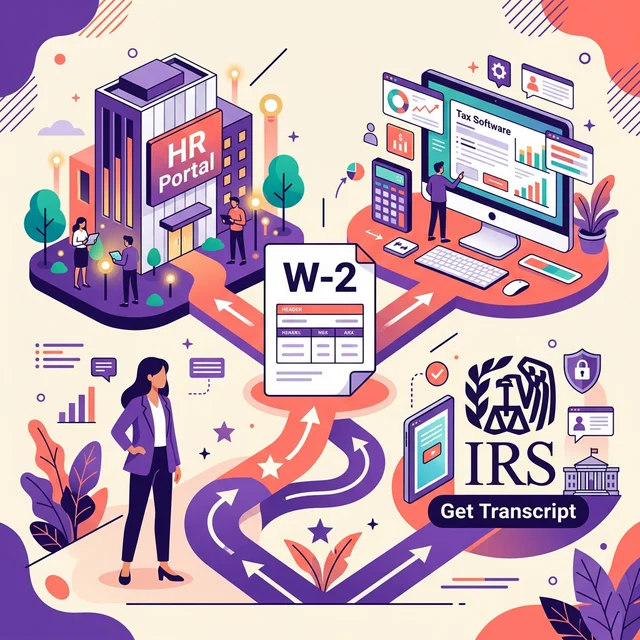
You can get your W2 online for free primarily through your employer's payroll portal or by checking with the tax software you used last year. If these options don't work, you can request a tax transcript from the IRS, which provides most of your W2 information. Many employers also mail paper copies by January 31st.
I've been building payroll systems for eight years, and one of the most common questions I get isn't about complex tax calculations or fringe benefits. Nope. It's almost always, "Where's my W2?" It's a simple form, but without it, filing your taxes feels impossible. Luckily, in our digital age, tracking down that elusive wage and tax statement is usually a lot easier than it used to be. You just need to know where to look.
Let's break down the best ways to find your W2 without spending a dime.
Unlocking Your W2: Your Employer's Digital Doorway
The absolute first place you should check for your W2 online is directly with your employer. Most companies these days don't just mail out paper W2s. They use online payroll platforms.
Think about it: fewer envelopes, less postage, greater security. For them, it makes perfect sense. For you, it means instant access.
Employer Payroll Portals: Your First Stop
Did your company use an online system for your paychecks? Almost certainly. This is your golden ticket. Many payroll providers offer employee self-service portals. This is where you might view your pay stubs, update your direct deposit, or even manage benefits. It's also where your W2 lives.
Common platforms include ADP, Paychex, Gusto, or QuickBooks Payroll. If you're not sure which one your employer uses, check your last pay stub for a company name or logo. You'll usually find a link to their portal right there.
Here's how you'd typically access it:
- Find Your Login: You likely created an account when you first started or when your employer switched payroll providers. You'll need your username and password. If you forgot them, there's usually a "Forgot Password" link. Don't panic if it's been a while; password resets are common.
- Navigate to Tax Documents: Once logged in, look for a section labeled "Tax Documents," "W2s," "Pay & Tax Statements," or something similar.
- Download: You should be able to download a PDF copy of your W2 directly to your computer. Print it, save it, do what you need to do.
Quick sidebar: This whole process usually takes less than five minutes if you remember your login. It's incredibly convenient.
When Your Employer's Portal Isn't an Option
Sometimes, you can't get to the employer portal. Maybe you left the job a while ago and your access expired. Perhaps it was a small business that still does everything manually. What then? Don't worry, you still have options.
Contact Your Former Employer Directly
Even if you're no longer working there, your old employer still has a legal obligation to provide your W2. They must furnish it by January 31st each year. If you moved, they might not have your current address. A quick phone call or email to their HR or payroll department can usually resolve this. Provide them with your current mailing address and email. Most will be happy to email you a digital copy or re-mail a physical one.
Important consideration: Employers can charge a small fee for duplicate copies if they've already provided the original. However, if they haven't sent it at all, they can't charge you for the first copy. Knowing your Pay Stub Requirements By State can also shed light on their general obligations for providing wage information.
Tax Software's Helping Hand: Auto-Import
Did you use tax preparation software like TurboTax, H&R Block, or TaxAct last year? This is a great alternative. Many of these platforms save your previous year's tax information.
When you start your tax return for the current year, the software often asks if you'd like to import data from last year. If your W2 was imported directly from your employer's payroll provider (which many support), there's a good chance it's still accessible within your account.
Log in to your previous year's tax software account. You might find a section where you can view or download forms from prior years. This isn't a guaranteed method, as some companies require an active subscription or recent use, but it's definitely worth checking.
The IRS: Your Ultimate Backup Plan
If all else fails, the IRS has your back. They get a copy of your W2 from your employer, so they can provide you with the information you need. This isn't a copy of the actual W2, but a "wage and income transcript."
Getting an IRS Tax Transcript Online
This is arguably the most reliable free method if your employer or tax software isn't cooperating. The IRS offers several ways to get your tax transcript, but the fastest is usually online.
- Visit the IRS Get Transcript Page: Head over to the official IRS website. they've a specific page for this: Get Transcript Online.
- Verify Your Identity: This is the most step. The IRS takes security seriously. You'll need to provide personal information like your Social Security Number, date of birth, filing status, and an address from your latest tax return. You'll also need a financial account number (like a credit card, mortgage, or auto loan) in your name.
- Choose Your Transcript: Select "Wage and Income Transcript." This shows data from information returns, like W2s, 1099s, and 1098s, for up to 10 prior tax years.
- Download and Print: Once verified, you can view and download your transcript instantly.
Keep in mind, a wage and income transcript usually doesn't show your state or local tax withholding information. Only the federal numbers are guaranteed. If you need state or local amounts, you'll still need to reach out to your employer or state tax agency.
Requesting a Transcript by Mail
If you can't pass the online identity verification (it happens, particularly if you've recently moved or changed banks), you can request a transcript by mail.
- You'll use the "Get Transcript by Mail" option on the same IRS page.
- The transcript will arrive at the address they've on file for you, usually within 5 to 10 calendar days.
Understanding What's On Your W2
Before we go any further, let's briefly clarify what a W2 is. It's formally known as the Wage and Tax Statement. Employers use it to report wages paid to employees and the taxes withheld from those wages. This includes federal income tax, Social Security, and Medicare taxes (FICA), and often state and local income taxes.
Without this form, you can't accurately file your federal or state income tax returns. It's a cornerstone of the U.S. tax system. For a deeper dive into common payroll terms, you might check our payroll glossary.
Here's a quick look at the key boxes on a W2 and what they represent:
| Box Number | Description | What it Means for You |
|---|---|---|
| Box 1 | Wages, tips, other compensation | Your total taxable wages for federal income tax. |
| Box 2 | Federal income tax withheld | How much federal tax your employer already sent to the IRS on your behalf. |
| Box 3 | Social Security wages | Total wages subject to Social Security tax (up to the annual limit, which is $168,600 for 2024). |
| Box 4 | Social Security tax withheld | The amount of Social Security tax your employer withheld. (It's 6.2% of Box 3). |
| Box 5 | Medicare wages and tips | Total wages subject to Medicare tax (no limit). |
| Box 6 | Medicare tax withheld | The amount of Medicare tax your employer withheld. (It's 1.45% of Box 5). |
| Box 7 & 8 | Social Security tips & Allocated tips | If you received tips, these boxes report them. |
| Box 10 | Dependent care benefits | Shows amounts paid by your employer for dependent care benefits. |
| Box 12 | Codes for various types of compensation | Reports various types of compensation, like elective deferrals to 401(k)s (Code D), health savings accounts (Code W), etc. |
| Box 16 | State wages, tips, etc. | Your total taxable wages for state income tax. |
| Box 17 | State income tax withheld | How much state tax your employer already sent to your state tax agency. |
| Box 18 | Local wages, tips, etc. | Your total taxable wages for local income tax. |
| Box 19 | Local income tax withheld | How much local tax your employer already sent to your local tax agency. |
Understanding these boxes helps ensure accuracy when you're filing. If any of these numbers seem off, that's a red flag.
Dealing with Special Cases: Gig Economy and Contractors
Real talk: Not everyone gets a W2. If you're an independent contractor, freelancer, or gig worker (like many Uber drivers, for example – we've got a whole article on Pay Stubs For Uber Drivers), you generally won't receive a W2. Instead, you'll get a Form 1099-NEC (Nonemployee Compensation) from each client or platform that paid you $600 or more in the tax year.
Why the difference? W2s are for employees. 1099s are for contractors. Employees have taxes withheld from every paycheck. Contractors are responsible for paying their own self-employment taxes (Social Security and Medicare) and estimated income taxes throughout the year. This distinction is really important, as the IRS spells out clearly in their Publication 15 about employer obligations.
If you should have received a W2 but got a 1099, or vice-versa, that's a classification issue that needs to be resolved with your employer. It can have significant tax implications for you. If you need to generate proof of income for a loan or apartment application, even if you're a freelancer, a well-organized record of your earnings is essential. Our proof of income generator can help consolidate this.
What if the Deadline Passes and No W2 Arrives?
The legal deadline for employers to furnish W2s to employees is January 31st. If it's February and you still don't have it, don't just sit there. Take action!
- Contact Your Employer (Again): Reach out to your employer's payroll or HR department. Confirm they've your correct address. Ask when and how they sent it.
- Contact the IRS: If it's after February 14th and you still haven't received your W2, you can call the IRS directly at 800-829-1040. They can contact your employer on your behalf. You'll need your employer's name, address, and Employer Identification Number (EIN) if you've it. You'll also need your dates of employment and an estimate of your wages and federal tax withheld.
- File Form 4852: If April 15th (or tax day) rolls around and you still don't have your W2, you can file Form 4852, "Substitute for Form W-2, Wage and Tax Statement." This form allows you to estimate your wages and withheld taxes using your pay stubs and other records. I've seen clients do this when things get really messy. This is where having detailed pay stubs really pays off. If you're missing those too, you can always make your check stub today to help estimate for this form.
Keeping Good Records: Your Best Defense
My best advice as someone who lives and breathes payroll data? Keep good records. Every single pay stub you receive has vital information on it. It lists your gross pay, deductions, and most importantly, year-to-date (YTD) totals for your wages and taxes withheld.
If you ever lose your W2, your pay stubs are an invaluable resource for reconstructing that information. They'll give you accurate numbers for Boxes 1, 2, 3, 4, 5, 6, 16, 17, 18, and 19. It’s like having a mini-W2 in your hands every payday.
For small businesses, managing all this can be tricky. There are plenty of free payroll tools out there that can help them stay organized, so employees like you don't have to scramble for information.
Frequently Asked Questions
What if my employer refuses to provide my W2?
If your employer won't provide your W2, first try contacting them in writing (email is fine) to create a record. After the January 31st deadline, and after February 14th, you can contact the IRS directly. They'll intervene on your behalf or instruct you on how to file Form 4852.
Can I get a W2 from the Social Security Administration (SSA)?
No, the Social Security Administration (SSA) doesn't issue W2 forms to individuals. While they do receive wage data from employers, they can only provide you with your earnings record for Social Security purposes, not an actual W2 form. The IRS is the place to go for wage and income transcripts.
Is it safe to get my W2 online?
Yes, it's generally safe to get your W2 online through secure employer portals or the official IRS website. These platforms use encryption and identity verification to protect your sensitive information. Always ensure you're on a legitimate website (look for "https://" and a padlock icon) before entering personal details.
What information do I need to get my W2 from the IRS?
To get your W2 information from the IRS online, you'll need your Social Security Number, date of birth, filing status, and an address from your latest tax return. You'll also need a financial account number (like a credit card, mortgage, or auto loan) in your name for identity verification.
Sources
- Get Transcript Online — Internal Revenue Service
- Employer's Tax Guide (Publication 15) — Internal Revenue Service
- W-2 Form: What it's, How It Works, How to Get One — Investopedia
- Fair Labor Standards Act (FLSA) — U.S. Department of Labor
- Payroll Administration — Society for Human Resource Management
Your Actionable Takeaway
Don't let a missing W2 stop you from filing your taxes on time. Start with your employer's online portal, then check your tax software from last year. If those don't work, head straight to the IRS website for a free wage and income transcript. And remember, good record-keeping throughout the year, especially with your pay stubs, makes all of this a breeze. If you ever need to create a professional record of your earnings, you can generate your paystub now.

About ValidPaystubs Editorial Team
Articles on ValidPaystubs are written and maintained by the editorial team at Sweethelp LLC, the company that operates this site from Sheridan, WY. We are a small team, not a firm of accountants — we build the tool and document how US payroll figures work, citing the IRS and state revenue departments so you can check any number against its source. Nothing here is tax, legal or financial advice, and for a decision that matters you should talk to a licensed professional.
View Profile