Fake Pay Stub vs Real Pay Stub: How to Tell the Difference (2026 Detection Guide)
Fake Pay Stub vs Real Pay Stub: How to Tell the Difference
Pay stub fraud is rising. With easy access to online generators (including, frankly, tools like ours), the barrier to creating convincing-looking documents has never been lower.
If you're a landlord screening tenants, a lender evaluating loan applications, or an employer verifying candidate income, you need to know how to distinguish legitimate documentation from fabrications.
This comprehensive 2026 guide covers the specific red flags that reveal fake pay stubs, verification techniques that work, and what to do when you catch someone in the act.
Why Fake Pay Stubs Are a Growing Problem
The Accessibility Factor
Creating a passable fake pay stub once required:
- Adobe Photoshop skills
- Understanding of payroll formatting
- Access to professional printing
Today, anyone can:
- Find online generators
- Fill in any numbers they want
- Download a professional-looking PDF
The Motivation
People fake pay stubs for:
- Apartment applications: To qualify for rent they can't afford
- Auto loans: To get approved for larger vehicle purchases
- Personal loans: To borrow more than their income supports
- Employment verification: To inflate past salary
- Government benefits: To fraudulently obtain assistance
The Consequences
For the document creator:
- Criminal fraud charges
- Civil liability
- Loan default and collection
- Eviction and housing blacklist
- Employment termination
For the recipient who accepts fakes:
- Financial losses (unpaid rent, loan defaults)
- Legal liability (negligent verification)
- Reputation damage
- Regulatory penalties (for lenders)
12 Red Flags That Reveal Fake Pay Stubs
Red Flag #1: The Math Doesn't Add Up
This is the most common and easiest-to-catch error.
What to Check:
- Gross pay × pay periods = annual income (should match claimed salary)
- Net pay = Gross pay - Total deductions
- YTD totals = Sum of all prior periods + current period
- Individual deductions total = Total deductions shown
Example Catch: Claimed salary: $75,000/year Weekly gross on stub: $2,500 Reality: $2,500 × 52 = $130,000/year Mismatch = Fraud
Red Flag #2: Round Numbers Everywhere
Real payroll produces specific amounts.
Suspicious:
- $5,000.00 gross
- $1,000.00 federal tax
- $4,000.00 net
Realistic:
- $4,876.23 gross
- $892.41 federal tax
- $3,642.18 net
Fraudsters often use round numbers because they're easier to fabricate.
Red Flag #3: Incorrect Tax Calculations
This catches sophisticated fakes.
For 2026:
- Social Security: 6.2% (only up to $168,600 annual)
- Medicare: 1.45% (all wages) + 0.9% over $200k
- Federal income: Progressive brackets, not flat rates
Common Fraud Errors:
- SS tax deducted on income over wage base
- Flat percentage deductions ("20% taxes")
- Missing Medicare or state taxes
- Tax amounts that don't match withholding tables
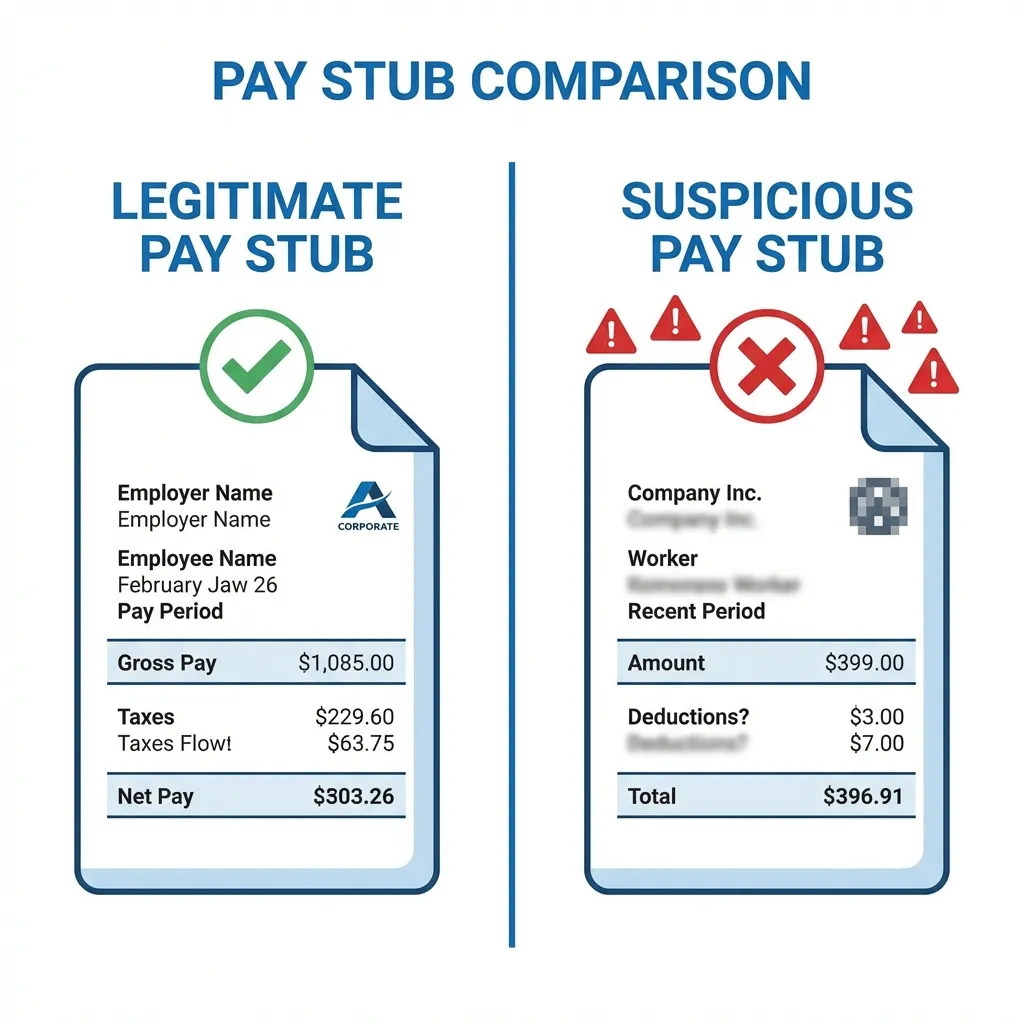
Red Flag #4: Missing or Generic Employer Information
Suspicious:
- "ABC Company"
- No address listed
- No EIN (Employer Identification Number)
- Generic city/state
Professional:
- Full legal company name
- Complete physical address
- EIN displayed (XX-XXXXXXX format)
- Actual recognizable employer
Red Flag #5: Mismatched Fonts and Formatting
Real payroll software uses consistent formatting.
What Fakes Often Show:
- Multiple font styles (mixing Arial and Times New Roman)
- Inconsistent font sizes within sections
- Misaligned columns or rows
- Uneven spacing between elements
Professional Indicators:
- Consistent typography throughout
- Aligned decimal points in columns
- Proper margins and spacing
- Standard payroll fonts (Courier for numbers)
Red Flag #6: Low Image Quality or Blurriness
When someone fakes a stub and needs to hide imperfections:
Suspicious:
- Blurry logos
- Low-resolution overall
- Pixelated text
- "Aged" appearance on supposedly recent document
Professional:
- Crisp, clear text
- High-resolution company logo
- Clean lines and graphics
- 300 DPI or higher print quality
Red Flag #7: Spelling and Grammar Errors
Real payroll systems don't have typos.
Watch For:
- "Social Securtiy" instead of "Social Security"
- "Fedreal Tax" instead of "Federal Tax"
- Inconsistent capitalization
- Grammar errors in any descriptive text
Red Flag #8: Missing Standard Elements
Every legitimate pay stub includes:
Essential Elements:
- Pay period dates (start and end)
- Payment date
- YTD columns for earnings AND deductions
- Hours worked (for hourly employees)
- Employer address
Often Missing on Fakes:
- Employee ID number
- Check number or direct deposit reference
- Detailed deduction breakdown
- Legal disclaimers or footer text
Red Flag #9: Unrealistic Income for the Job
Context matters.
Questions to Ask:
- Does this salary make sense for the stated position?
- Is a "Retail Associate" really earning $95,000?
- Does the company actually pay this much for this role?
Cross-reference with:
- Glassdoor salary ranges
- Bureau of Labor Statistics data
- Company job postings
Red Flag #10: Document Metadata Issues
If you have access to PDF properties:
Check For:
- Creation software (legitimate: ADP, Paychex, Intuit; suspicious: random PDF editors)
- Creation date vs. pay period date
- Author metadata
- Edit history (if available)
A stub dated December 2025 shouldn't have a creation date of January 2026.
Red Flag #11: No Employer Verification Possible
Major Red Flag:
- Employer phone number doesn't work
- Address doesn't exist
- Company can't be found online
- EIN lookup returns no results
Verification Steps:
- Google the employer
- Call the main company line (not number on stub)
- Verify address exists
- Check EIN through IRS records
Red Flag #12: Inconsistency with Other Documents
Compare the pay stub against:
- Tax returns (should roughly match W-2 equivalents)
- Bank statements (deposits should match net pay)
- Employment verification letters
- Previous pay stubs
Discrepancies between documents indicate fabrication somewhere.
Verification Techniques That Work
Technique 1: Call the Employer Directly
Do:
- Look up the company's main number independently
- Ask for HR or Payroll department
- Request employment and income verification
Don't:
- Call a number provided on the stub (could be fake)
- Accept verbal confirmation from the applicant's "supervisor friend"
Technique 2: Request Additional Documentation
Ask for multiple documents that should be consistent:
- Last 2-3 pay stubs (YTD should progress correctly)
- Bank statements showing deposit amounts
- Previous year's tax return or W-2
- Employment offer letter
Fabricating consistent documentation across multiple documents is much harder.
Technique 3: Use Verification Services
Professional services verify income and employment:
- The Work Number (Equifax)
- Argyle
- Truework
- National Tenant Network (for landlords)
These pull directly from employer payroll systems, bypassing document authenticity concerns entirely.
Technique 4: Examine Document Properties
For digital PDFs:
- Right-click file > Properties
- Check "Application" (creation software)
- Note creation/modification dates
- Look for unusual metadata
Legitimate stubs from ADP show ADP as creator. Stubs from "Adobe Photoshop" are suspicious.
Technique 5: Calculate Tax Accuracy
Use a payroll calculator:
- Input the gross pay amount
- Set to appropriate state
- Compare calculated taxes to stub
- Significant discrepancies indicate fraud
Free calculators: PaycheckCity, ADP Calculator, SmartAsset
What to Do When You Catch a Fake
For Landlords
Immediate Steps:
- Do not approve the application
- Document the discrepancy
- Inform the applicant of denial (you don't need to explain why)
- Keep the fraudulent document on file
Legal Considerations:
- You may report to local police (document fraud is a crime)
- You may not be required to report
- Consult attorney before escalating
For Lenders
Immediate Steps:
- Deny the loan application
- Document the fraud in your system
- Follow internal fraud protocols
- May be required to file SAR (Suspicious Activity Report)
Regulatory Obligations:
- Federally regulated lenders have reporting requirements
- Consult compliance department
For Employers
If a Candidate Faked Documents:
- Do not extend offer (or rescind if already made)
- Document the discrepancy
- Consider industry blacklist reporting (if legal in your jurisdiction)
If a Current Employee Fakes for External Purpose:
- Generally not your problem unless they misused company materials
Why Legitimate Tools Like ValidPaystubs Exist
The Legitimate Use Cases
ValidPaystubs and similar tools serve real needs:
- Self-employed individuals documenting their income
- Small businesses creating employee pay stubs
- Individuals recreating lost documentation
- Contractors needing proof of income
Our Responsibility
We:
- Encourage accurate information entry
- Provide legally compliant tax calculations
- Create professional-grade documentation
- Do not facilitate or encourage fraud
The Fraud Reality
Any tool can be misused. A word processor can create fake documents. Our responsibility is to serve legitimate users; preventing all misuse is impossible.
What distinguishes legitimate use:
- Information entered matches actual income
- Documents are used as accurate representation
- User has rightful claim to the income shown
For Individuals: Creating Legitimate Documentation
If You Need Pay Stubs
Legitimate Reasons:
- Self-employed, need proof of income
- Lost original documents
- Employer won't provide copies
- Small business owner paying yourself
The Right Approach:
- Enter actual, accurate income information
- Use appropriate templates for your situation
- Never inflate income or fabricate employment
- Be prepared to verify through other means
Building Trust with Verifiers
Supplement your generated stubs with:
- Bank statements showing actual deposits
- Tax returns for annual verification
- Employment letters or contracts
- References who can confirm
Layered documentation is more convincing and demonstrates legitimacy.
Frequently Asked Questions
Can landlords legally reject fake pay stubs?
Absolutely. Fraudulent documentation is grounds for immediate application rejection. In many jurisdictions, it may be reported to authorities.
Is making a fake pay stub illegal?
Yes. Creating fraudulent documents for financial gain is typically:
- Fraud (civil and criminal)
- Forgery in some jurisdictions
- Wire fraud if transmitted electronically
What's the penalty for using a fake pay stub?
Penalties vary but may include:
- Criminal charges (misdemeanor or felony)
- Civil liability for damages
- Lease termination and eviction
- Loan default and collection
- Permanent record affecting future applications
How can I tell if my own genuine pay stub looks fake?
If verifiers question your legitimate stub:
- Provide additional documentation (bank statements, tax returns)
- Offer to have employer verify directly
- Request verification services access (The Work Number)
Are there "fake-proof" pay stubs?
No document is completely unfakeable. However, verification through the employer or verification services bypasses document concerns entirely.
Summary: Detection Checklist
Before accepting any pay stub, verify:
- Math adds up (gross - deductions = net)
- YTD totals are consistent
- Tax calculations are accurate
- Employer information is verifiable
- Format is professional and consistent
- No spelling or grammar errors
- Income is realistic for position
- Multiple documents are consistent
- Employer can be contacted independently
Need legitimate income documentation?
Professional templates. Accurate calculations. For legitimate documentation needs.
Sources & References

About ValidPaystubs Editorial Team
Articles on ValidPaystubs are written and maintained by the editorial team at Sweethelp LLC, the company that operates this site from Sheridan, WY. We are a small team, not a firm of accountants — we build the tool and document how US payroll figures work, citing the IRS and state revenue departments so you can check any number against its source. Nothing here is tax, legal or financial advice, and for a decision that matters you should talk to a licensed professional.
View Profile